

My dashboard
Home › Overview. A buyer’s first screen: where I stand against my target, where my time goes, what has just happened. The profiles that open it are the buyer, the procurement manager and the administrator; Procurement management opens on Steering, the consolidated view of the department. Allow five minutes to read it.
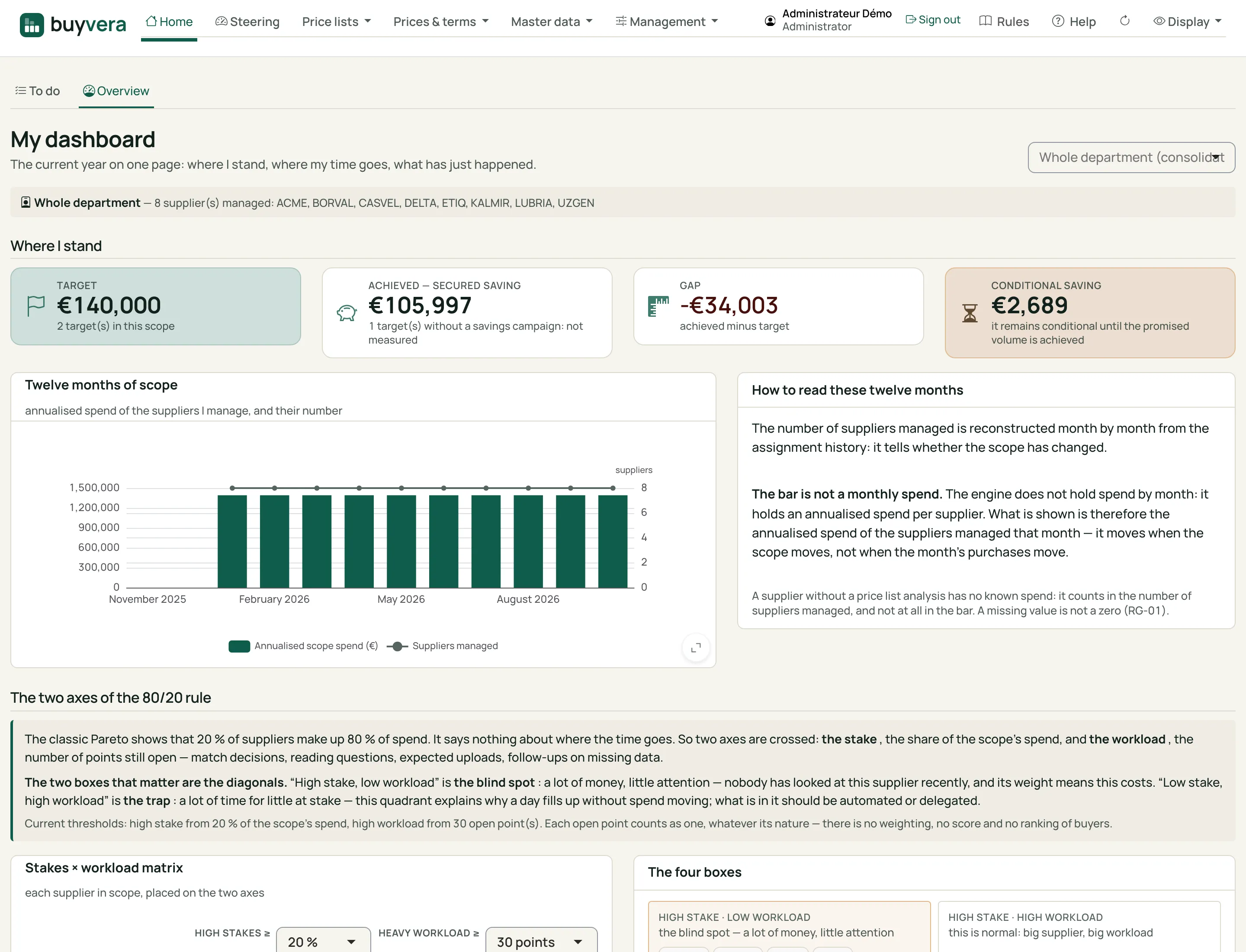
My dashboard
Click a number to read what it points to.
- Scope — your suppliers, or the whole department if your profile allows it.
- Target — the year's savings goal on your scope.
- Savings achieved — what is already won. A target with no savings campaign is called "not measured", not counted as zero.
- Gap — achieved minus target.
- Conditional savings — won under a condition (a promised volume, for example): it stays apart until the condition is met.
- Twelve months of scope — the annualised spend of the suppliers you hold, and their number, month by month.
- The two axes of the 80/20 — who weighs on spend, and who takes your time. They are not the same suppliers.
- Stake × workload matrix — each supplier of the scope, placed on the two axes.
1. Where I stand
Section titled “1. Where I stand”- Target: the year’s goal and what is achieved to date, with the conditional part.
- A target with no savings campaign is called not measured: it is never counted as zero.
- Conditional savings stay apart until the condition (a promised volume, for example) is met.
2. Where my time goes
Section titled “2. Where my time goes”- Twelve months of scope: the suppliers you hold, month by month. The bar is the annualised spend of the suppliers held that month: it moves when the scope moves, not when the month’s purchases move. Two lines must not be confused: actual spend and the target.
- The two axes of the 80/20: who weighs, and who moves. The suppliers that concentrate spend are not those whose prices move the most; the screen shows them side by side.
- Latest highlights: price lists received, analyses produced, open alerts.
The stake × workload matrix, at the bottom of the screen, is the best starting point for a week. The “high stake, low workload” cell is the blind spot: a lot of money, and nobody has looked at this supplier recently.
What next
Section titled “What next”Know what is waiting: My tasks.